Tuesday, June 19, 2012

Shipment Tracking and Data Syncing

Hi,

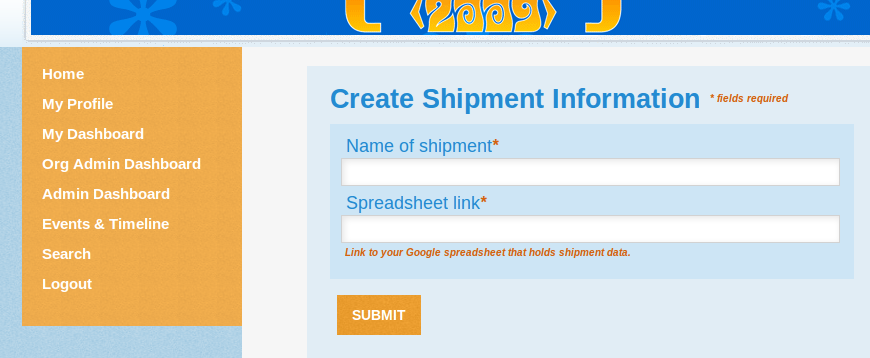
This week I spent time working on Syncing of shipment tracking data, available on admin dashboard with student shipment list which is available on student dashboard.  First I sorted out the consumer key and consumer key secret problem which were set to none, by creating an API access key for http://localhost:8080/ and then supplied them in respective fields in http://localhost:8080/site/edit page.  

And the whole week had been a great experience for learning by mistakes. I pushed a wrong commit “Change date format” in gsoc/views/trackings shipmenttracking branch and happened to mix up the commit messages of two patches “Change date format” and “Change worksheet id”  ‘.’ I learnt these situations can be avoided with extra carefulness  while pushing the branch to remote origin.

I also thought of changing the column names in soc.modules.gsoc.tasks.trackings and not to hardcore the worksheet id in spreadsheet link. A discussion with Madhu made me clear that since Google provides us data in the particular format and the code is written according to that so I need not think about that. So the shipment tracking and sync part has been integrated successfully to melange and this week I’ll be working on Proposal Sync and hoping that I’ll make it work by this weekend.

Melange Functional Testing

Hi,

This week i worked on developing test scripts for testing Profile Page and Search Page but i spent major part of this week on developing a script for loading and running these test scripts one by one. Initially i tried to run them with bin/run-tests in soc but i was not successful and faced a lot of issues so i made a new functional-run.py script for executing these test cases one by one in my local environment and the way i want them to run.

Options that i provided in this functional-run.py script:
(1) -r  for report format, whether you want result on console(default) or you want a html based report. If you give the option like this $ python functional-run.py -r "html", a result folder is created in the functional folder where all the test scripts are saved and then it pick up all the files whose name start with "test" and executes them one by one and finally a html based report is saved in functional/results folder.

(2) -v for virtual display, if you want to execute all the scripts in virtual display. when this option is provided script.  All the scripts are executed virtually and you will not see thier execution in firefox. you will only see the final result either on console or in result report depending upon the report format you had chosen.

Currently this script is only for executing functional tests in my local environment.

Monday, June 18, 2012

Planning and Bug Fixes

So this week really hasn't been as productive as I had been hoping it would be between a rather annoying bug in dashboard and a ludicrous amount of time at work. After implementing a less-than-optimal fix where I just manually store the name of the organization for a Connection for the getListData() query in dashboard.py (~line 1270), I have reached a point where:

  • Users and org admins can view Connections that they have initiated (e.g. if a user initiates a Connection, they can view it in their dashboard but the org admin cannot view it under "Requests for My Organizations")
  • The query for the user will actually fetch all GSoCConnection objects involving the User, but will not display them all so I'm assuming it's a Javascript problem
  • The above is true for the org admin side, but I don't thing that the org_admin_for property is being set correctly because it doesn't contain a full list of the organizations that the org admin is responsible for
  • If I had to guess, I'd say that the Javascript will likely be a problem as well once I figure out the above problem.
Given that this is a demo, I think that there are a bunch of changes I'd like to make and it would be counter-productive to spend a bunch of time fixing them. Instead, I think I'm going to try and combine all of the requirements into one module with ConnectionPage and ShowConnection views. Daniel and I have worked out some changes to the Connection module that will simplify the flow of the interaction. Plus, and doing so will give me the extra control I think I need. I have a design of the two views on a legal pad sitting next to me and can either scan them or whip up a Google doc (or Wiki on Google Code) to divulge the design if anyone would like to see it. In the meantime I think I'm going to put the dashboard fix on the back burner so that I can try to work on this connection view.

Tuesday, June 12, 2012

Melange Functional Testing

Hi,

This week i did a little bit reading on nose test runner and other articles on functional testing. I was travelling to my home town so i was not able to do much this week, though i have started work on creating test script for Profile Page.

I am learning a lot of new things and that makes me feel good. I am continuously making changes to base module to make it much better. I hope that in few days base module will be good enough to be accepted. As soon as this module will be accepted, i will start sending test scripts. Instead of using TC01 and TC02 for naming test data sheets. I am planning to give them more meaningful names like Gsoc_Student_Registration and Gsoc_Profile. Leo has reviewed my first patch and suggested few changes, i am currently in process of making those changes to make the base module much better. After Profile page, my plan is to create test script for Search page and Events & Timeline page.

Extension and Integration with External APIs : Shipment Tracking and Data Syncing

Hi
Though the previous week’s strategy of working on my own local branch worked well but it was too much duplicating of work as many of the patches had already been integrated with Shipmenttracking branch and Madhu said that the time could be better spent on implementing the features. He asked me to continue working on the shipmenttracking branch itself and integrate the rest of the patches. I integrated the rest of the patches viz.
“Add dashboard for students to view shipments.”
“Add view works as proxy view to deliver JS requests.”
I ran bin/paver build --skip-pylint command to create taggable folder in build, which was initially not there because current melange doesn’t contain it. Made correction in module import in gsoc.views.proposal and gsoc.views.trackings.py files.
Create and edit of the shipment tracking info successfully added on the admin dashboard  but when we try to sink the spreadsheet with melange, it fails. I tried to debug what the source of the error was and suspect that it is            

due to missing consumer_key and consumer_secret. Both of the variables are set to “None”, which causes an AttributeError at gdata.Oauth.redirect.
Oauth_input_params are set to “None” and in app/service.py and the function setOAuthInputParameters in soc.views.helper.gdata_apis.oauth.py to reset them but consumer_key and consumer_secret are also of “Nonetype”. I have mailed Madhu regarding the issue and hoping to solve it soon.

Monday, June 11, 2012

Connection Demo

I spent my development time this week working on a demo implementation of the connection strategy, utilizing existing code in gsoc/views/invite.py and request.py for simplicity's sake. I'm going to spend the next couple of weeks cleaning everything up and, as mentioned in my previous post, consider the option of replacing request.py and invite.py with connection.py. This option is seeming more and more appealing as I move on since (as previously mentioned) it doesn't matter who initiated the connection, only that one exists. There is no distinction between a request and an invitation, so I don't see basis for separating them. I know that there are a lot of things I need to fix before I actually submit everything to the main repo and I've made note of them; the goal of this week was merely to get a working replacement of GSoCRequest with GSoCConnection up and running. I'm using pastebin here and haven't committed anything to a branch of the main repo to save myself revisions while I'm finishing up the demo.

A lot of what I've done is simplify the logic of the two modules to use GSoCConnection rather than GSoCRequest - nothing too elaborate yet. Here's a snippet from request.py, which handles the POST request when a User requests to become a mentor for a particular organization. It generates a GSoCConnection instance between the User and the organization properly and forwards the user onto the view_request page (which I'm going to replace later). I've made changes to the checkAccess() and context() methods to facilitate this change, though the latter isn't done yet. Here's the post snippet from invite.py, again context() is still in progress.

One big hangup I've run into is the dashboard presentation and query of these connections. I tried changing a few columns of the ListConfiguration in the __init__() method of my ConnectionComponent class only to find that the table no longer displayed. That said, I dug into the ListConfiguration class and then rewrote the init method to fit my needs (discovering the Python lambda functions in the process, which are fantastic). However, I'm stumped on the following query in the getListData() method:
q = GSoCConnection.all()
 if self.for_admin:
      q.filter('organization IN', self.data.org_admin_for)
 else:
      q.filter('user =', self.data.user)
No matter what I do I cannot seem to get any Organization or User objects to equate or match in this query, even when I know that there are valid objects meeting the criteria in the datastore. I've used the logging module extensively to try to get to the root of the problem but am at a loss as to what I need to do to fix it. Other than that, this week has been an excellent learning experience and I feel far more comfortable with the view system and the lifecycle of a RequestHandler subclass, which will be useful when building the connection module.

GSoC 2012 Extension and Integration with External APIs

Sorry for not being able to stay connected with and work for the community last week first of all
owing to some health issues. I could not do much work.I started out with creating a new local branch out of the current master branch and integrated first three changes of shipmenttracking branch viz.  Add task for syncing shipment tracking data[0], Implement the shipment tracking admin views for setting the document to sync [1] and Add the modules necessary for shipment tracking [2] and it works well.


[0]http://code.google.com/p/soc/source/detail?r=179cdc3d628ac637928e1adcb26c581692465055&name=shipmenttracking
[1]http://code.google.com/p/soc/source/detail?r=c18d34cd83e8f282931813c26d6abf1246a389bf&name=shipmenttracking
[2]http://code.google.com/p/soc/source/detail?r=a5dfbf735e3852bb37d98748428be56844783331&name=shipmenttracking